
Preview Draft Finder and projected rookie ratings
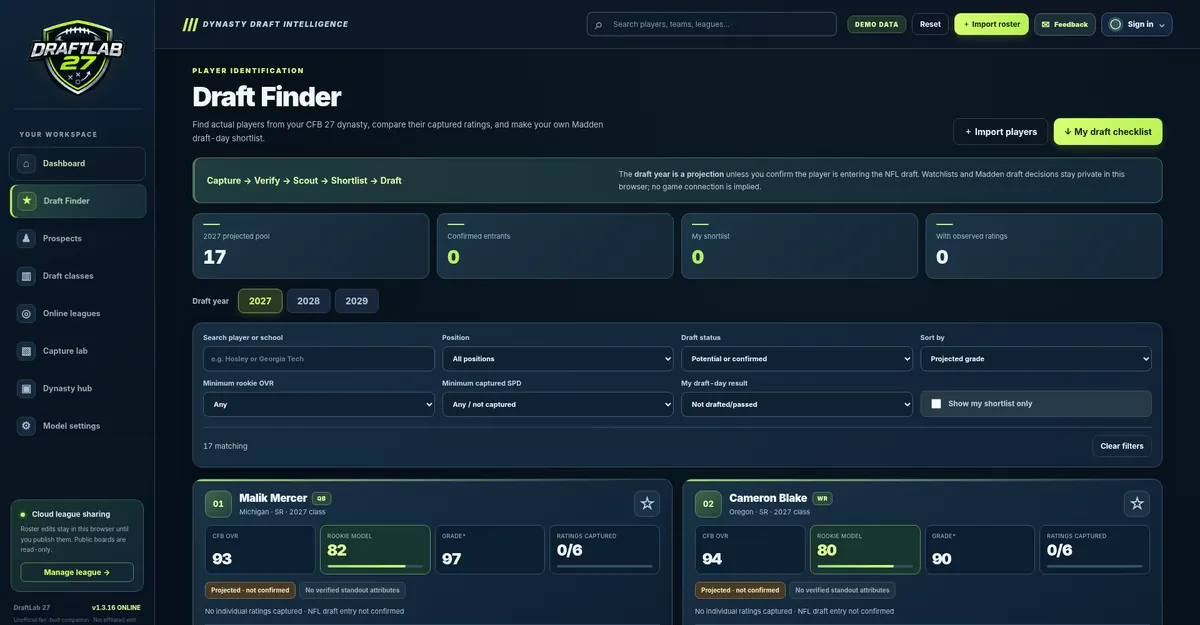
Import your own verified college players to replace the demo data. Draft Finder helps you search, shortlist and compare prospects instead of relying on a generic real-world player database.
Compare real captured ratings
After importing approved players, use Draft Finder to compare their captured college overall ratings and attributes side by side. Sort and filter your prospects based on the information you confirmed in Capture Lab.
It is useful for tracking multiple positions, noticing athletic outliers or deciding which players to revisit before your dynasty season ends.
Make your own shortlist
Add interesting prospects to your shortlist and use the comparison view to evaluate them. This is a private scouting workspace, not a shared Madden server account. Your choices are stored locally as a guest, or in an optional Google-linked cloud workspace when you explicitly save.
Understand Madden rookie projections
DraftLab produces rule-based experimental rookie-rating estimates from imported player information. These are approximate scouting scenarios; they are not official Madden attributes, a prediction guaranteed by EA, or a native draft-class export.
Use them as an extra comparison, not as a replacement for ratings you observed in the game.
Personal versus online leagues
For personal scouting, stay in Prospects and Draft Finder. The Online Leagues page is for a commissioner to publish a read-only prospect board and share its link with friends. Creating a public league uses a separate private commissioner key and does not automatically expose a personal Google cloud workspace.
From a fictional dynasty to your class
- Capture and approve college player records using the screenshot/MP4 guide.
- Review draft eligibility. A projected year or senior standing by itself does not prove the player declared.
- Use Draft Finder to create a shortlist and compare their modeled rookie numbers.
- Choose the draft year under Draft classes and inspect the available projections.
- Export a staging CSV/JSON or In-game entry sheet. For Madden 27, use the game's own editor to enter the player information manually. Read the platform instructions.
Create your board
Start by capturing a single roster, verifying the values, then shortlisting a handful of prospects. You can expand the board as your season progresses.